Features: Real-Time Cost Estimation
One of the biggest challenges in cloud management is controlling costs. CloudNOOE tackles this head-on with its integrated Real-Time Cost Estimation engine. This feature provides immediate, transparent, and actionable insights into your cloud spending before you deploy, helping you eliminate budget overruns and build more cost-effective infrastructure.
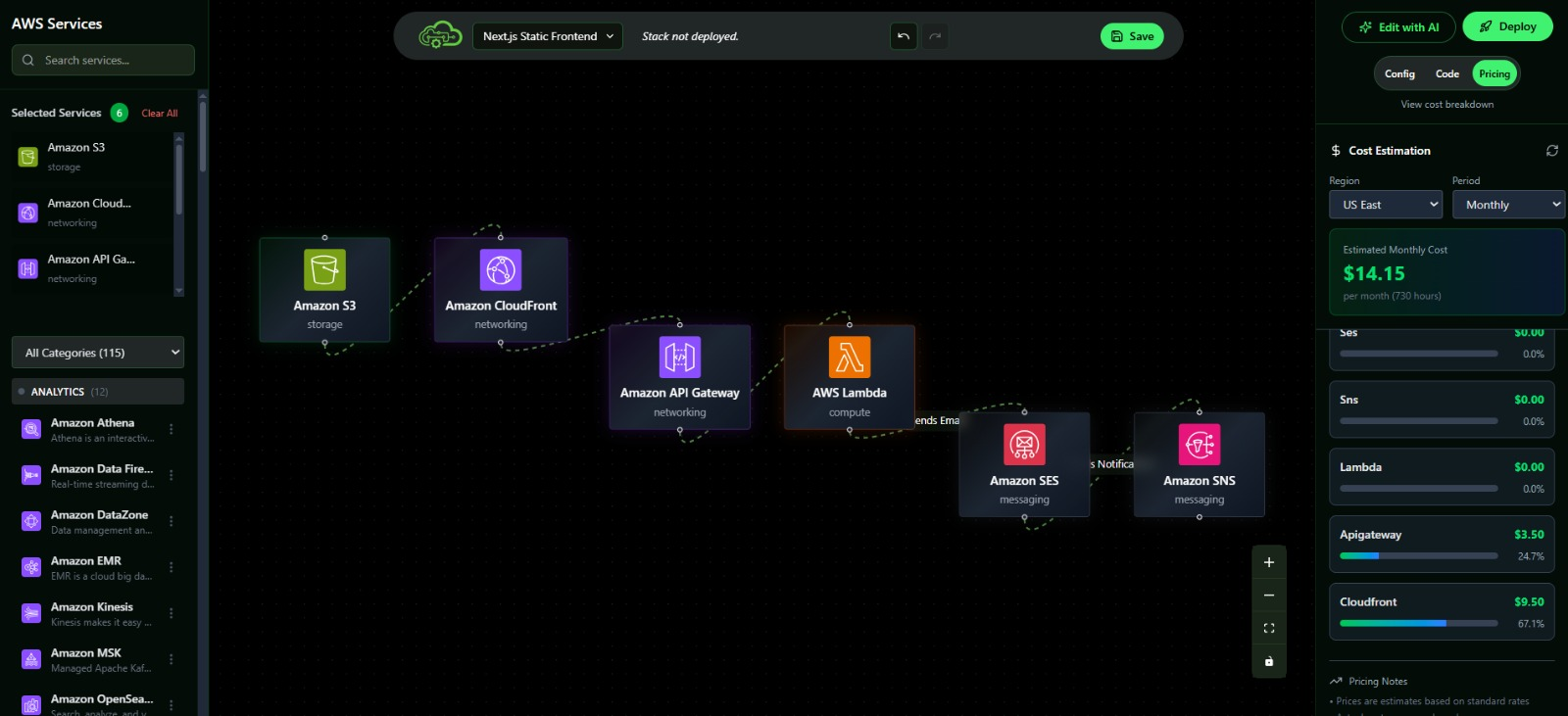
As you design your architecture using the AI Assistant or the Visual Editor, every change is instantly reflected in the cost dashboard.
How It Works
CloudNOOE's cost engine is powered by the latest pricing data directly from AWS. It analyzes every resource in your workspace and calculates the projected cost based on its configuration.
- Live Updates: When you add a resource, change an instance type, or increase storage, the cost dashboard updates instantly.
- Granular Breakdown: See a detailed, line-by-line breakdown of costs for each resource, including compute, storage, data transfer, and more.
- Multiple Views: Toggle between hourly, monthly, and annual cost projections to align with your budgeting cycle.
The Power of Proactive Optimization
Traditional cost management is reactive. You receive a bill at the end of the month and then hunt for savings. CloudNOOE makes cost optimization a proactive part of the design process.
| Aspect | Traditional Approach | The CloudNOOE Way |
|---|---|---|
| Timing | Reactive (end-of-month bill analysis) | Proactive (real-time, during the design phase) |
| Visibility | Opaque; requires separate cost calculators. | Transparent; fully integrated into the workflow. |
| Impact | Often too late; budget is already spent. | Immediate; make cost-saving decisions on the fly. |
| Estimated Savings | Manual effort yields moderate savings. | Up to 40% savings through informed, early choices. |
Key Capabilities
1. Instant Cost Feedback
The moment you drag an m5.2xlarge instance onto the canvas, you'll know exactly what it will cost you per month. This immediate feedback loop empowers you to make smarter, cost-conscious decisions from the very beginning.
2. "What-If" Scenarios
Easily compare the cost implications of different architectural choices.
- What if I use a
t3.largeinstead of at4g.large? - What is the cost difference between Provisioned IOPS (io1) and General Purpose (gp3) EBS volumes?
- How much can I save by switching to Graviton (ARM-based) instances?
CloudNOOE lets you answer these questions in seconds, simply by changing a resource's configuration and observing the cost update.
3. Automated Optimization Suggestions
CloudNOOE's intelligence goes beyond simple calculation. The platform actively looks for ways to save you money.
- Rightsizing Recommendations: The AI may suggest that a smaller instance type could handle your workload for a lower cost.
- Storage Tiering: For S3 buckets, it might recommend implementing lifecycle policies to move infrequently accessed data to cheaper storage classes.
- Spot Instance Suitability: For stateless or fault-tolerant workloads, the platform can highlight opportunities to use Spot Instances for savings of up to 90%.
Pro Tip: Use Cost-Based Decision Making
When designing a new feature, use the cost estimator to guide your architectural decisions. For example, you can directly compare the cost of a serverless approach using Lambda and API Gateway versus a traditional approach using EC2 and a Load Balancer. This allows you to balance performance, scalability, and cost to find the perfect solution for your needs.
Next Steps
- Once you're happy with your design and its cost, it's time to Deploy it to AWS.
- Learn more about designing cost-effective systems in our Architecture Design Best Practices.